Yoodley is reader-supported. When you buy through links on our site, we may earn an affiliate commission.
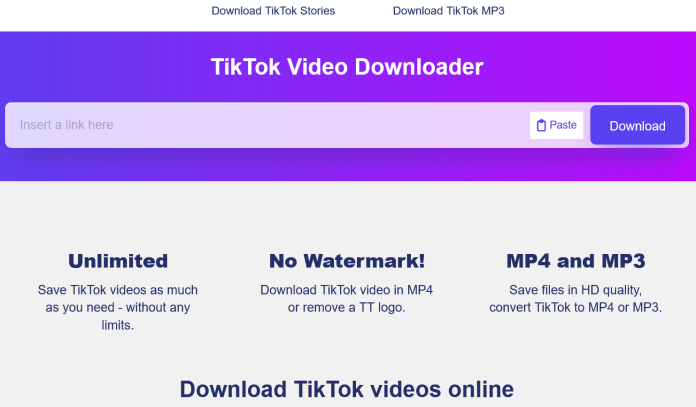
SSSTik is a free TikTok Downloader that works in your web browser. Paste a TikTok link and it gives you a direct download link for the video. When TikTok has a watermark-free version of the video, that’s the file you get. You don’t need an account, registration or any software, and it takes three steps on a desktop computer, phone or tablet.
What the SSSTik TikTok Downloader does
Many people want a quick way to download TikTok videos without installing another app. If that’s you, a browser-based tiktok video downloader handles it with one copy and paste. SSSTik processes the link you give it and returns the video file that’s available from the source. Where the source has them, downloads come as MP4 files in HD quality.
About the TikTok watermark: SSSTik doesn’t edit the watermark out of a video. It gives you a direct link to a watermark-free version when TikTok has one available. Your file’s quality depends on what the original upload offers.
SSSTik covers two main tasks:
- Video downloader: save TikTok videos from a public post link as MP4 files where available.
- Stories downloader: save TikTok Stories you want to keep before they expire.
You can use SSSTik as many times as you need. There’s no sign-up and no download limit, so it works for saving one clip or a short list of tutorials.
How to download TikTok videos in three steps
The steps are the same on desktop, Android, iPhone and iPad. Only the way you copy the link changes slightly.
- Copy the link. Open the video in the TikTok app or on the website, tap the Share button, and choose Copy link. On a desktop computer, you can also copy the URL from your browser’s address bar.
- Paste the link. Go to SSSTik and paste the link into the input field at the top of the page.
- Download. Click the download button, wait a moment for processing, and choose the download option that appears.
The file saves to your browser’s default download folder. On phones and tablets, you may need to open your browser’s downloads list or files app to move the video to your photo library.
Saving TikTok Stories
TikTok Stories disappear after a short time, so save a Story while it’s still live. The process is the same as for a regular video: copy the Story link, paste it into SSSTik, and download the file. If the Story has already expired or been removed, there’s nothing left to download.
Why people save TikTok videos
Short-form videos can disappear for many reasons. Creators delete posts, accounts get suspended, and users switch their profiles to private. Saving a public video while it’s available gives you a personal copy for later. Common reasons include:
- Offline viewing during travel or when mobile data is limited
- Creators backing up and repurposing their own videos
- Educators keeping tutorial clips for lessons
- Researchers and journalists archiving public footage for reference
- Keeping personal memories before a post is gone
SSSTik can’t recover content after it’s been deleted or made private. Download success depends on the video still being publicly available.
Tips for a smooth tik tok download
- Copy the full link from the Share menu, not a cropped or edited URL.
- Check that the video is public and still online before pasting the link.
- If a download stalls, refresh the page and paste the link again.
- Expect HD quality only when the original upload was posted in HD.